MCP with Entra auth + Copilot & Cowork

Security is important; everyone knows that. If you (like me) are in the Microsoft enterprise space, then Entra ID is usually the mechanism you use to secure your stuff. But how do we use Entra ID to control access to MCP servers? This is the topic I intend to explore in this blog post. So, let’s spend some time digging up all the dirt and leaving no stone unturned when it comes to using Entra with your MCP servers.
The joy of the OAuth resource parameter in MCP
My setup when exploring MCP over the last couple of years has usually been to use the C# MCP SDK, because I am a C# guy and have always been. When I used this SDK to explore the Agent 365 MCP servers (now rebranded as Work IQ) back in December 2025, I hit a snag with MCP Entra ID auth, which is chronicled here. As it turns out, the issue I hit is still plaguing us today, something we’ll get back to later in this post. From my December post:
However, if we run this - it fails! The reason for the failure is that Entra ID - which is securing the MCP Server - does not accept the
resourceparameter that is sent by the C# Model Context Protocol SDK in the OAuth2 flow. This particular problem is discussed in various places:
- This issue discusses this issue in detail.
- Here is a pull request that claims to fix the issue.
The C# MCP SDK actually follows the MCP specification, which mandates that the
resourceparameter should be passed when authorizing. But Entra doesn’t accept the parameter…
So, the issue at that time was that Entra rejected the resource parameter that was sent by the C# SDK MCP client, when trying to authenticate. At that point, and for my demo to work, I simply forked the C# MCP SDK and removed the resource parameter, which “solved” the problem (don’t do this in production, folks…).
Today, a little over seven months later, Entra no longer always rejects the resource parameter (the old-school error AADSTS901002: The 'resource' request parameter is not supported is less frequent nowadays), but instead applies certain validations (good ones, necessary for security) that make life a bit difficult for those of us who want to use Entra for MCP.
This results in the new and shiny error AADSTS9010010: The resource parameter provided in the request doesn't match with the requested scopes. So, things are still not as they should be, and the C# MCP SDK issue that was opened last summer is also still open. There still seems to be a lot of confusion out there regarding this, and many “fixes” still resort to simply removing the resource parameter to make it work with Entra, sometimes while recognizing that this might not be ideal for security (see, for example, here).
As I also noted in my blog post in December, there is a proposal to relax the requirement to use the resource parameter in the MCP specification, but it has still not made its way into the spec - and it probably never will because of security implications - see the comments. So, as things stand as of July 2026 this is what the draft for the upcoming 2026-07-28 specification says:
MCP clients MUST implement Resource Indicators for OAuth 2.0 as defined in RFC 8707 to explicitly specify the target resource for which the token is being requested. The resource parameter:
- MUST be included in both authorization requests and token requests.
- MUST identify the MCP server that the client intends to use the token with.
- MUST use the canonical URI of the MCP server as defined in RFC 8707 Section 2.
Instead of enjoying the summer sun, let’s dive into the intricacies of what is going on here, the issues that might come up when using Entra ID for MCP auth, and how to fix them.
Getting started
First, a primer on what the MCP specification says about authorization. MCP defines three different ways for an MCP client to “register” with an authorization server:
- Preregistration - basically hardcoded client IDs; SHOULD be supported.
- CIMD (Client ID Metadata Documents) - SHOULD be supported.
- DCR (Dynamic Client Registration) - MAY be supported and is kept for compatibility with earlier MCP authorization versions.
Of the above-mentioned mechanisms, only preregistration is supported by Entra.
In earlier versions of the MCP specification, DCR was something that SHOULD (not MAY) be supported, and in the past I have repeatedly given Microsoft flak for not supporting DCR, for example when trying out the Agent 365 MCP Servers - mainly because it made it almost impossible to use the MCP Servers with the MCP Inspector tool.
Attempts have been made to “equip Entra with DCR” by creating a translation layer that fixes all the Entra quirks and makes it play nice with MCP clients. This blog post by Matthew Groff is an interesting read; he goes through the various errors and issues you encounter when trying to secure MCP with Entra and “solves” them using a proxy. Well worth a read.
But it turns out that there are a number of very good reasons why DCR and CIMD are ill-suited for enterprise scenarios. Merill Fernando at Microsoft gives a good overview of this in this video, and the reasoning can also be found here on his GitHub, where he has the following to say about DCR and CIMD:
From a threat modeling perspective, both DCR and CIMD expand the attack surface:
DCR-specific risks:
- Malicious agents could register apps to harvest tokens
- Compromised MCP clients could spawn new app registrations to persist access
- App registration quotas could be exhausted (denial of service)
CIMD-specific risks:
- SSRF — auth server fetches attacker-controlled URLs (see CIMD risks section above)
- DDoS amplification — auth server used as a fetch proxy
- Localhost impersonation — no TLS on localhost redirect URIs
- Metadata mutability — client can change its metadata document after authorization
All of this makes sense, and I have been ignorant and stupid for questioning the lack of DCR for MCP in Entra. Sorry Microsoft. With that long overdue apology out of the way, let’s continue by exploring the one client registration mechanism that Entra does indeed support - preregistration.
Preregistration is all you need
So, we already know that we need to preregister our clients in Entra in order for MCP auth to work, but just for the fun of it, let’s explore what happens if you create and run an OAuth 2.0-secured MCP server locally without any Entra setup and point VS Code (our client of choice) at it. We build as simple OAuth2 secured server using the C# MCP SDK:
var builder = WebApplication.CreateBuilder(args);

builder.Services
...
    .AddMcp(options =>
    {
        options.ResourceMetadata = new ProtectedResourceMetadata
        {
            Resource = resourceUri,
            AuthorizationServers = { entraAuthority },
            ScopesSupported = { requiredScope },
        };
    });

...

app.MapGet("/health", () => Results.Ok(new { status = "healthy" }))
    .AllowAnonymous();

app.MapMcp("/mcp")
    .RequireAuthorization();

app.Run(serverUrl);
The MCP server has a simple tool that will (eventually) return selected claims for the signed-in user:
[McpServerToolType]
public sealed class WhoAmITool(IHttpContextAccessor httpContextAccessor)
{
    [McpServerTool(Name = "whoami", ReadOnly = true)]
    [Description("Returns a safe subset of the validated caller's Microsoft Entra claims.")]
    public WhoAmIResult WhoAmI()
    {
...
        return new WhoAmIResult(
            TenantId: user.FindFirst("tid")?.Value,
            ObjectId: user.FindFirst("oid")?.Value,
            AuthorizedParty: user.FindFirst("azp")?.Value,
            Scopes: user.FindFirst("scp")?.Value);
    }
}
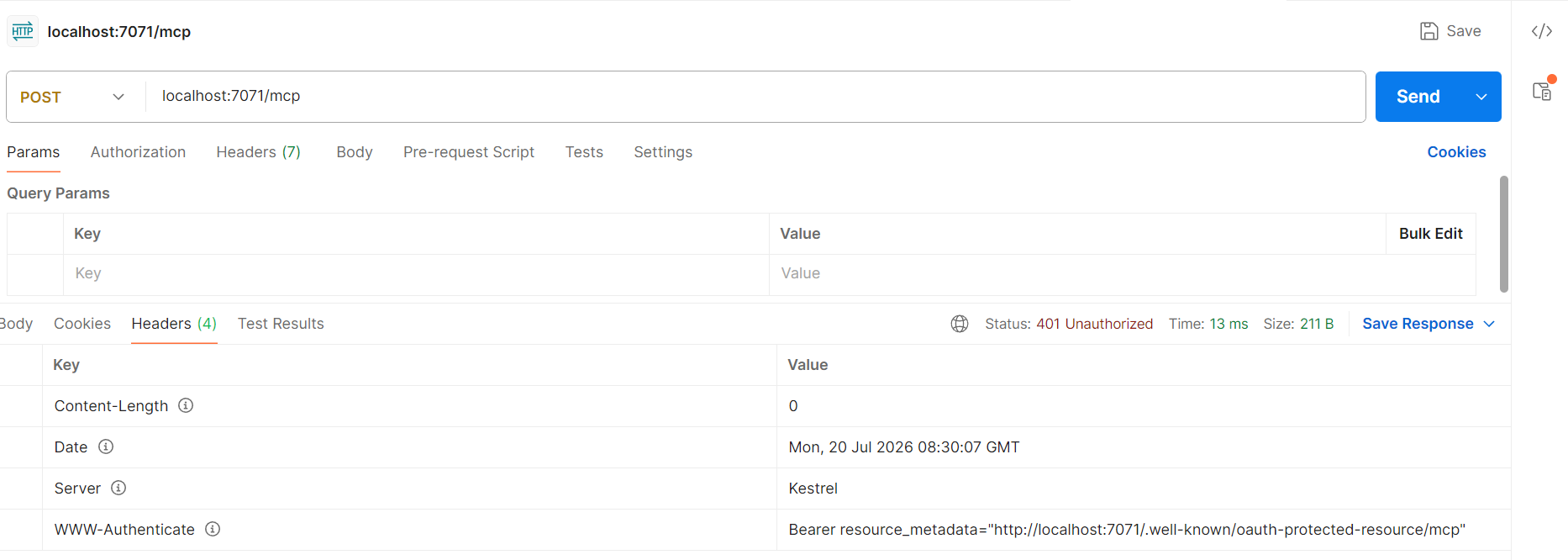
If we send an HTTP POST to our locally running MCP server, we get a 401 response and a reference to the authorization metadata:
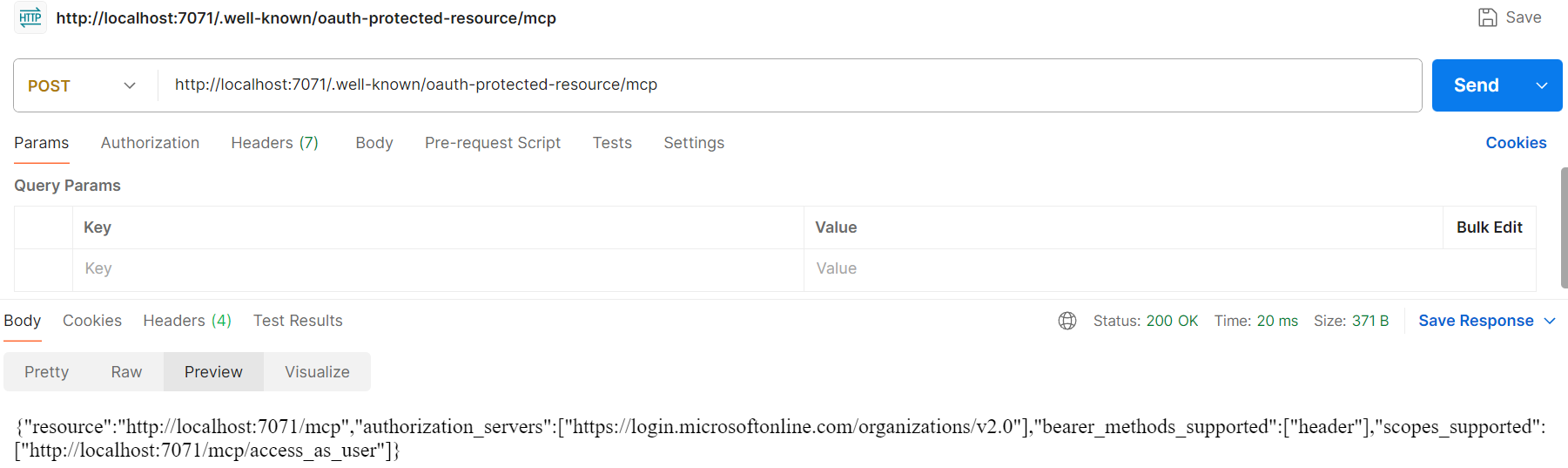
And if we call the metadata endpoint, we get this back - so our MCP server at least complies with the MCP specification’s authorization-server discovery requirement by implementing the OAuth 2.0 Protected Resource Metadata spec (RFC 9728):
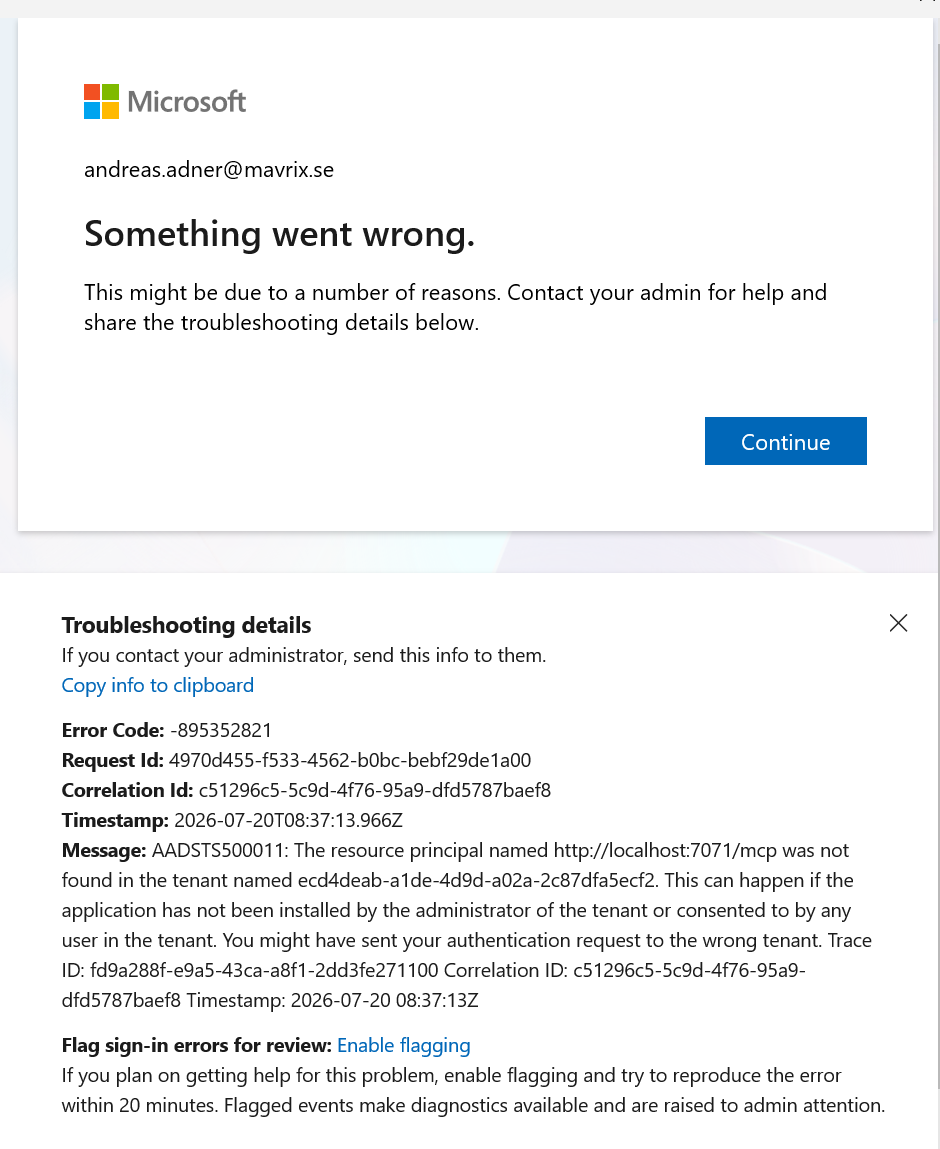
So, let’s point VS Code at our locally running MCP Server and see what happens. After trying to authenticate with Entra, it fails (as expected):
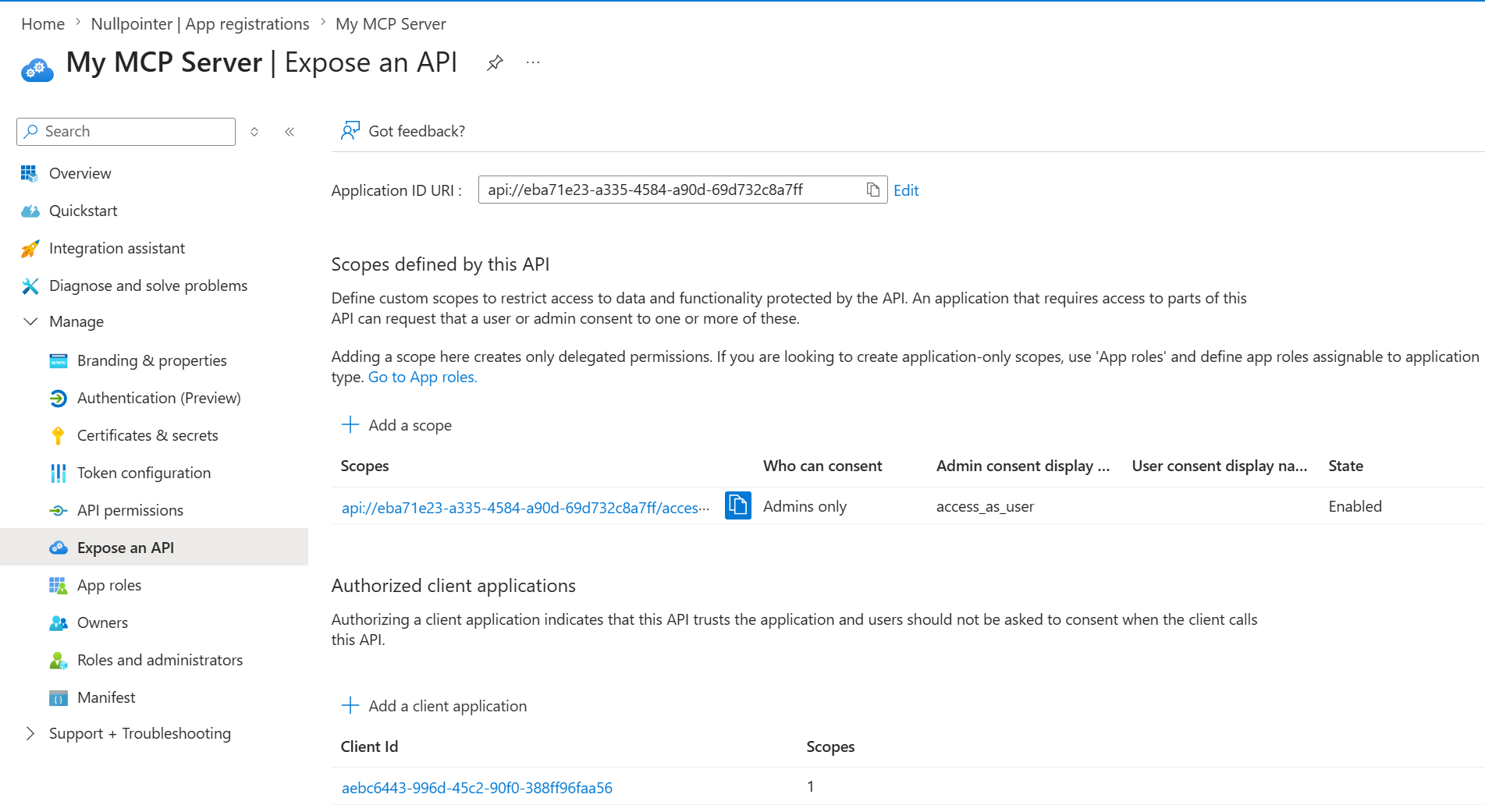
Of course it fails, we need to preregister our client (VS Code) in an app registration for our MCP Server in Entra, remember (and do loads of other stuff as well…)? So let’s do that! We create an app registration in Entra using the suggested defaults, add a scope and add the VS Code GUID (aebc6443-996d-45c2-90f0-388ff96faa56) as an Authorized Client application (which removes the need for user consent when using this client):
Make sure to set api.requestedAccessTokenVersion to 2 under Manifest.
We update the configuration for our MCP server to point at our newly created app registration:
{
  "Mcp": {
    "ServerUrl": "http://localhost:7071",
    "ResourceUri": "http://localhost:7071/mcp",
    "RequiredScope": "api://eba71e23-a335-4584-a90d-69d732c8a7ff/access_as_user"
  },
  "Entra": {
    "Authority": "https://login.microsoftonline.com/organizations/v2.0",
    "Audience": "eba71e23-a335-4584-a90d-69d732c8a7ff"
  }
}
Let’s also change a setting in VS Code to make the OAuth 2.0 flow as “pure” as possible: we set the user setting microsoft-authentication.implementation to msal-no-broker. When it is set to msal, I noticed that VS Code delegates authentication to WAM (Web Account Manager), which does all kinds of hocus-pocus under the hood and hides the issues we see with MCP and Entra in a normal flow. With msal-no-broker, authentication is performed in the browser.
Now, if we try to start the MCP server and authenticate, we get this error:
Error getting token from server metadata: ServerError: invalid_target: Error(s): 9010010 - Timestamp: 2026-07-20 10:36:12Z - Description: AADSTS9010010: The resource parameter provided in the request doesn't match with the requested scopes
Now we are getting somewhere. Remember the many issues with the OAuth 2.0 resource parameter we discussed above? So what is going on here?
Let’s investigate the error message. The resource parameter sent here is the canonical URI of the MCP Server - as required by the MCP specification (“The resource parameter MUST use the canonical URI of the MCP server as defined in RFC 8707 Section 2.”), which in this case is http://localhost:7071/mcp.
The required scope is api://eba71e23-a335-4584-a90d-69d732c8a7ff/access_as_user, as we defined when we added the scope to our app registration. The scope name combines the Application ID URI with the scope name, and the Application ID URI api://eba71e23-a335-4584-a90d-69d732c8a7ff is simply the default we received when we created the app registration. So what is the problem here?
Well, for security reasons, Entra checks that the requested scope matches the requested resource. This allows Entra to reject a malicious MCP server that asks the client to consent to scopes owned by some other API. And that’s a good thing.
But, since MCP-spec-compliant clients will always send the canonical MCP server URI as the resource parameter, the Application ID URI needs to be http://localhost:7071/mcp for that validation to succeed. So let’s try to change our Application ID URI to that in Entra:
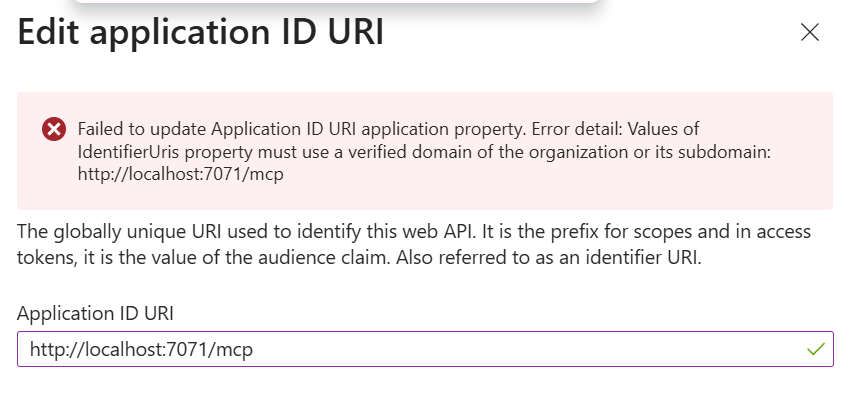
Oh, that didn’t work. It turns out that there are restrictions on what the Application ID URI can be set to when it has this format. If we want to use an HTTPS Application ID URI, its domain must be a verified domain - which localhost is not.
So, the MCP spec requirement to always pass the resource parameter and that it should be the canonical MCP Server URI clashes with Entra’s requirement that the required scopes and resource must match. So it seems that local debugging is off the table, at least without some more work… But fear not, we are gonna make this work without DCR proxies and other sorcery.
One might ask, is this only a VS Code issue? Actually, I created my own MCP Client using the C# MCP SDK, and could repro the same issue there, resulting in this trace:
authorization resource=http://localhost:7071/mcp
token request resource=http://localhost:7071/mcp
scope=api://.../access_as_user
AADSTS9010010
So, this is a general issue… That being said, there seem to be some ways of circumventing the Entra validation, even though the resource parameter is passed, some kind of dark magic that I don’t fully understand (and that the msal-broker in VS Code seem to be using under the hood…)
DNS to the rescue
So, let’s do what any responsible developer would do to solve this problem. We’re gonna:
- Deploy our MCP Server to a Container App in Azure.
- Give the MCP server a canonical URI on a verified domain - this means assigning a certificate and updating our DNS.
- Update the app registration so that the Application ID URI and scopes are aligned with this canonical URI.
Said and done, after some tinkering I now have a Container App running our MCP Server at https://seanastrakhan.nullpointer.se/mcp!
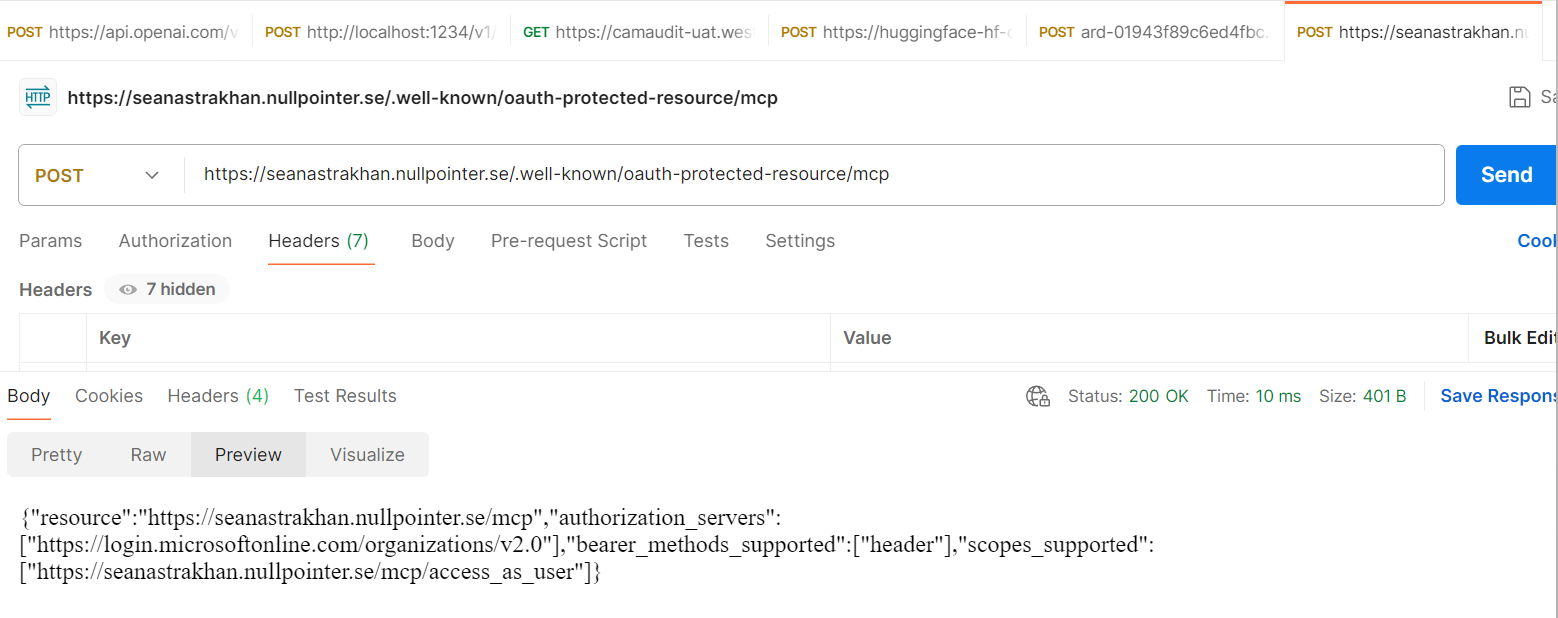
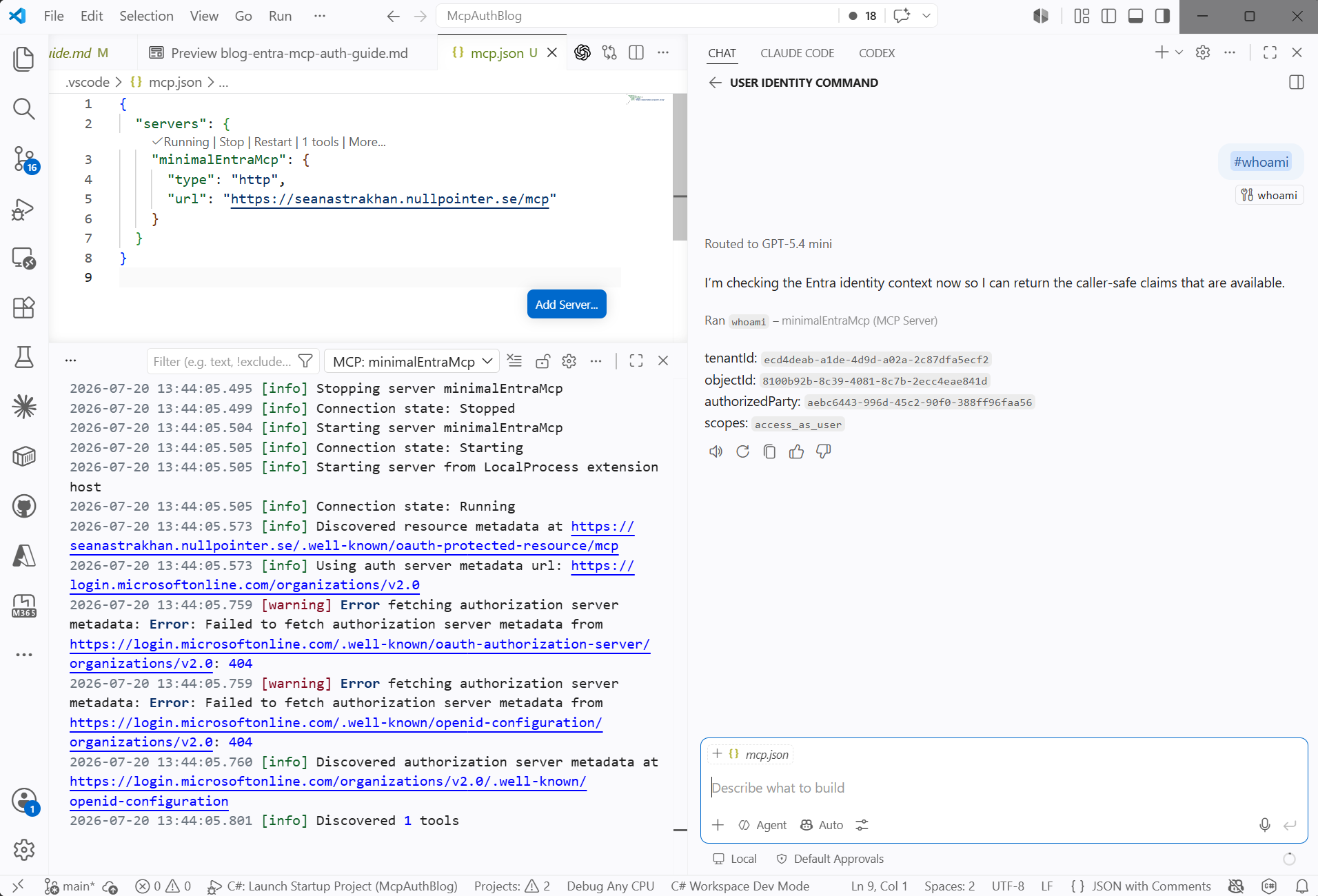
And it works! I can now start the MCP connection and authenticate in VS Code:
And the App Registration is properly updated with the Application ID URI set to the canonical URI of the MCP Server:
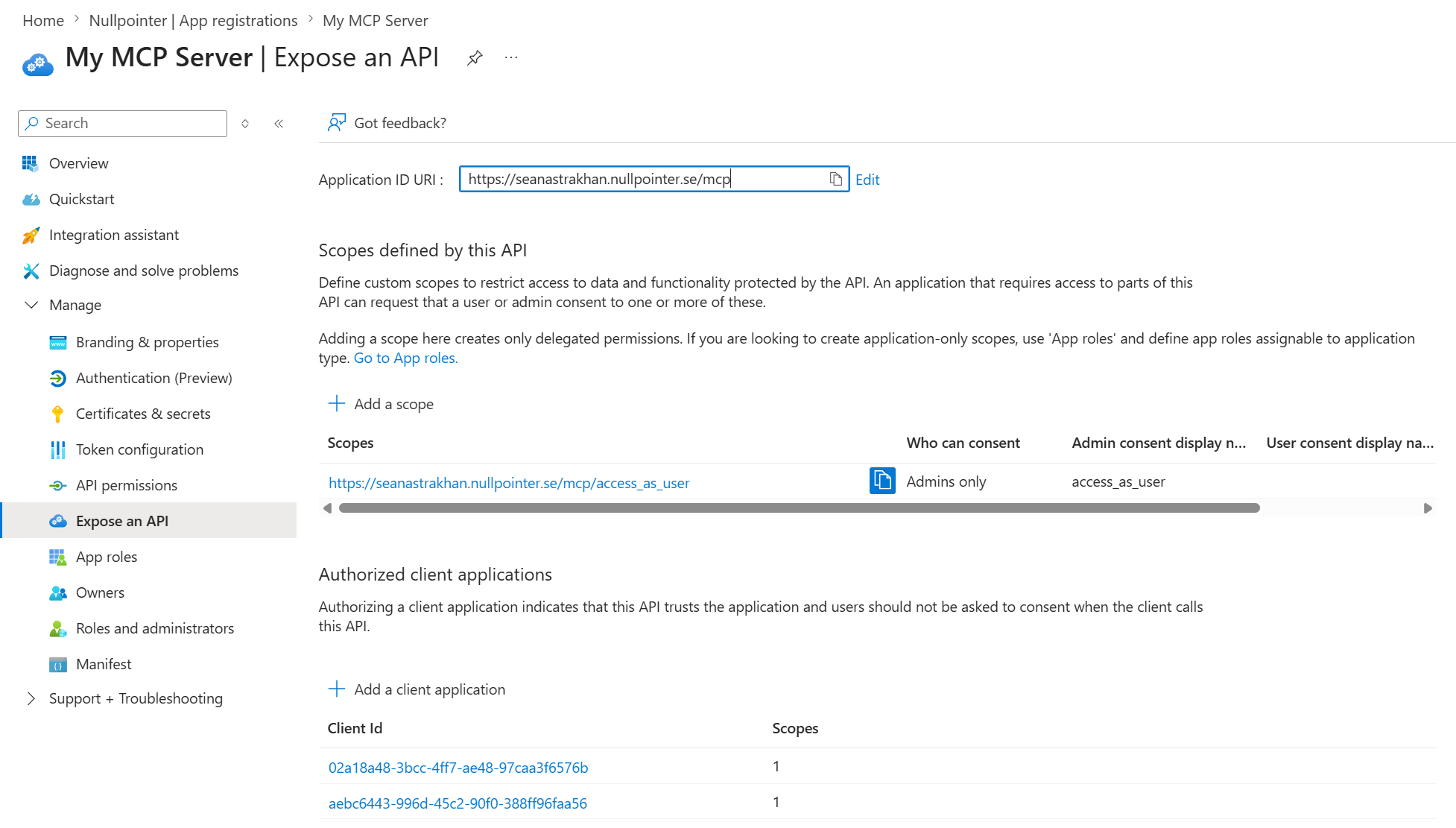
Doesn’t it feel good to be somewhat compliant with the MCP spec?
Copilot and Cowork
Next, just for the fun of it, let’s make our MCP server work with Entra auth and single sign-on in a Microsoft 365 Copilot declarative agent and Copilot Cowork.
There is actually pretty good documentation for configuring SSO for a declarative Copilot agent. Let’s follow the steps and see where they lead us:
Create the Entra SSO auth config
The recommended way to do this is to use the Agents Toolkit VS Code extension (ATK). After we follow the steps in the documentation and provision the agent in the tenant, an SSO configuration is created here in the Microsoft Enterprise token store:
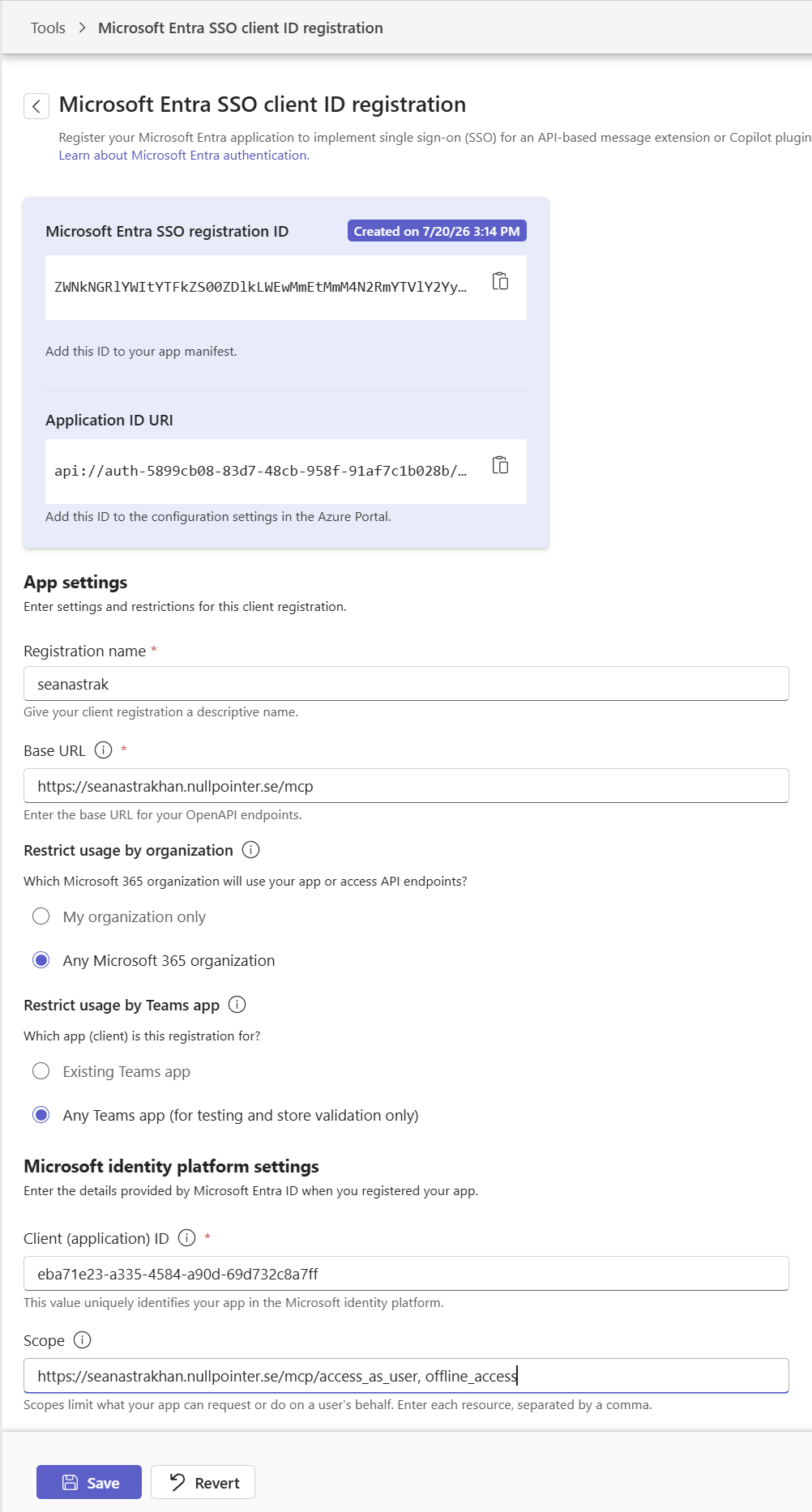
The Scope is missing, so we set it to https://seanastrakhan.nullpointer.se/mcp/access_as_user,offline_access. offline_access enables refresh-token behavior in the Enterprise token store; it is not an MCP API permission.
Connect the auth configuration to Entra
We then add the generated Application ID URI as another entry in identifierUris in the Manifest of our app registration, preserving the existing canonical HTTPS URI:
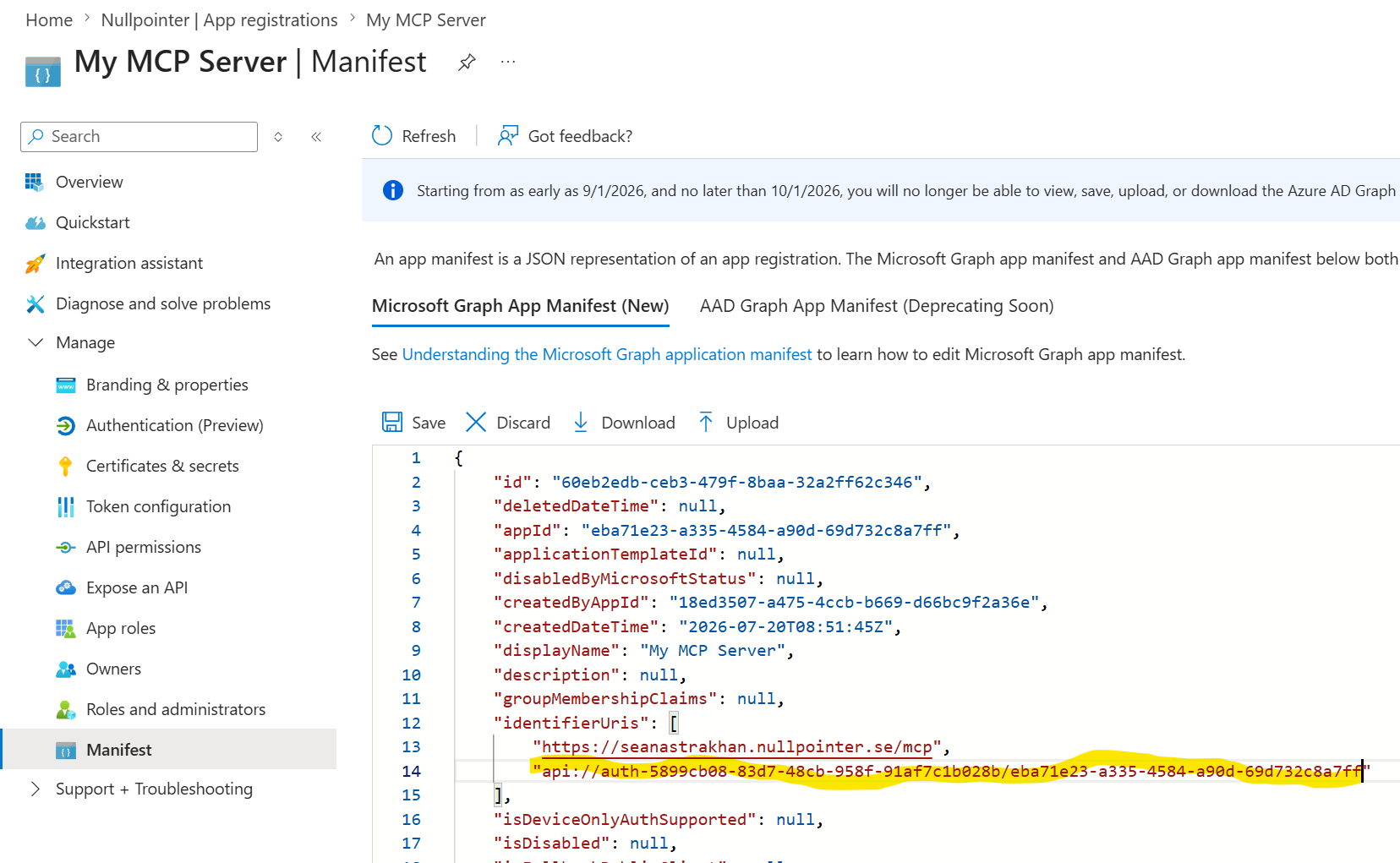
The Microsoft Entra SSO registration ID is already copied to our agent manifest; ATK handles that automatically when provisioning the agent.
Then, we do the following:
- Add
https://teams.microsoft.com/api/platform/v1.0/oAuthConsentRedirectas a Web redirect URI to our Entra app registration. - Pre-authorize the Microsoft Enterprise token store (GUID: ab3be6b7-f5df-413d-ac2d-abf1e3fd9c0b) for our scope, similar to what we did for VS Code above.
Note: In our setup, one additional step was required that the Microsoft walkthrough did not mention: we declared a delegated permission from the app registration to its own access_as_user scope. The portal did not list the app under My APIs, so we added the self-permission using Azure CLI and granted admin consent for it (When I say “we” I mean Codex, in close collaboration with Claude). This unusual arrangement is needed because the SSO configuration uses the same app registration as both the OAuth client identity and the protected API resource. Without the self-permission, our authentication trace failed with AADSTS650057, indicating that the requested resource was not listed in the client application’s required permissions. Phew.
Testing our Copilot agents
Since our declarative Copilot agent is already provisioned in our tenant, we can test it, and lo and behold, it works:
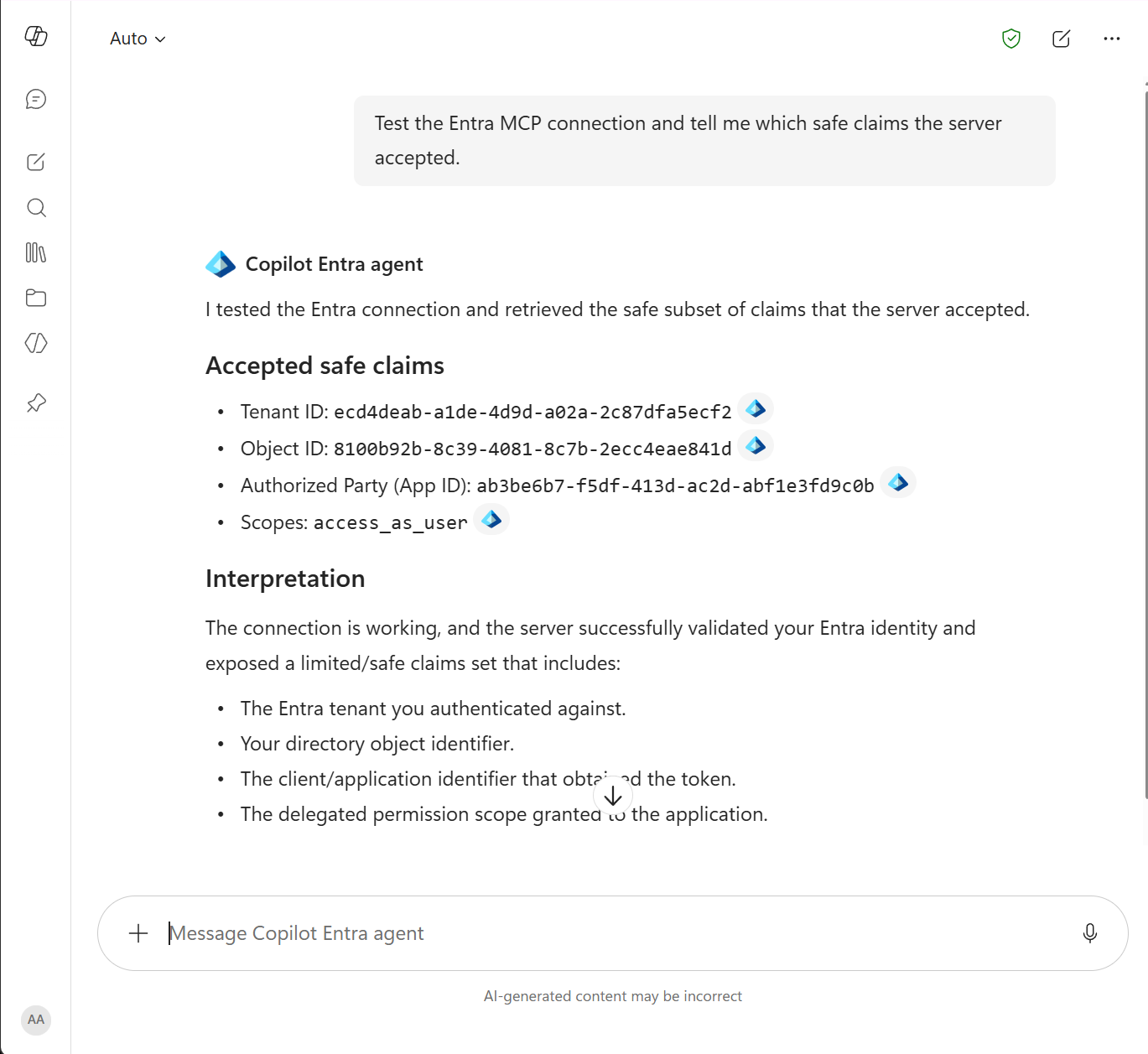
No Copilot-specific change was needed in the MCP server. The Enterprise token store obtained a normal Entra v2 delegated access token for the same API, and the server already accepted its API client-ID audience and access_as_user scope.
Now, moving on to Copilot Cowork. The documentation for creating plugins with MCP capabilities is a bit sparse, but the section about authentication discusses the Microsoft Enterprise token store, the same store that contains the configuration for our declarative Copilot agent and that ATK created for us earlier.
Could it be that we can simply reuse this configuration for our Copilot Cowork agent??? Let’s try it! We update the manifest with a connector definition that points to our MCP server and references the SSO configuration in the Enterprise token store:
 "agentConnectors": [
    {
      "id": "minimal-entra-mcp",
      "displayName": "Minimal Entra MCP",
      "description": "Provides authenticated identity inspection and an interactive Microsoft Entra cube.",
      "toolSource": {
        "remoteMcpServer": {
          "mcpServerUrl": "https://seanastrakhan.nullpointer.se/mcp",
          "authorization": {
            "type": "OAuthPluginVault",
            "referenceId": "ZWNkNG...xYjAyOGI="
          }
        }
      }
    }]
After packaging the plugin, we upload it to our tenant and enable it in Cowork. It turns out that this also works!
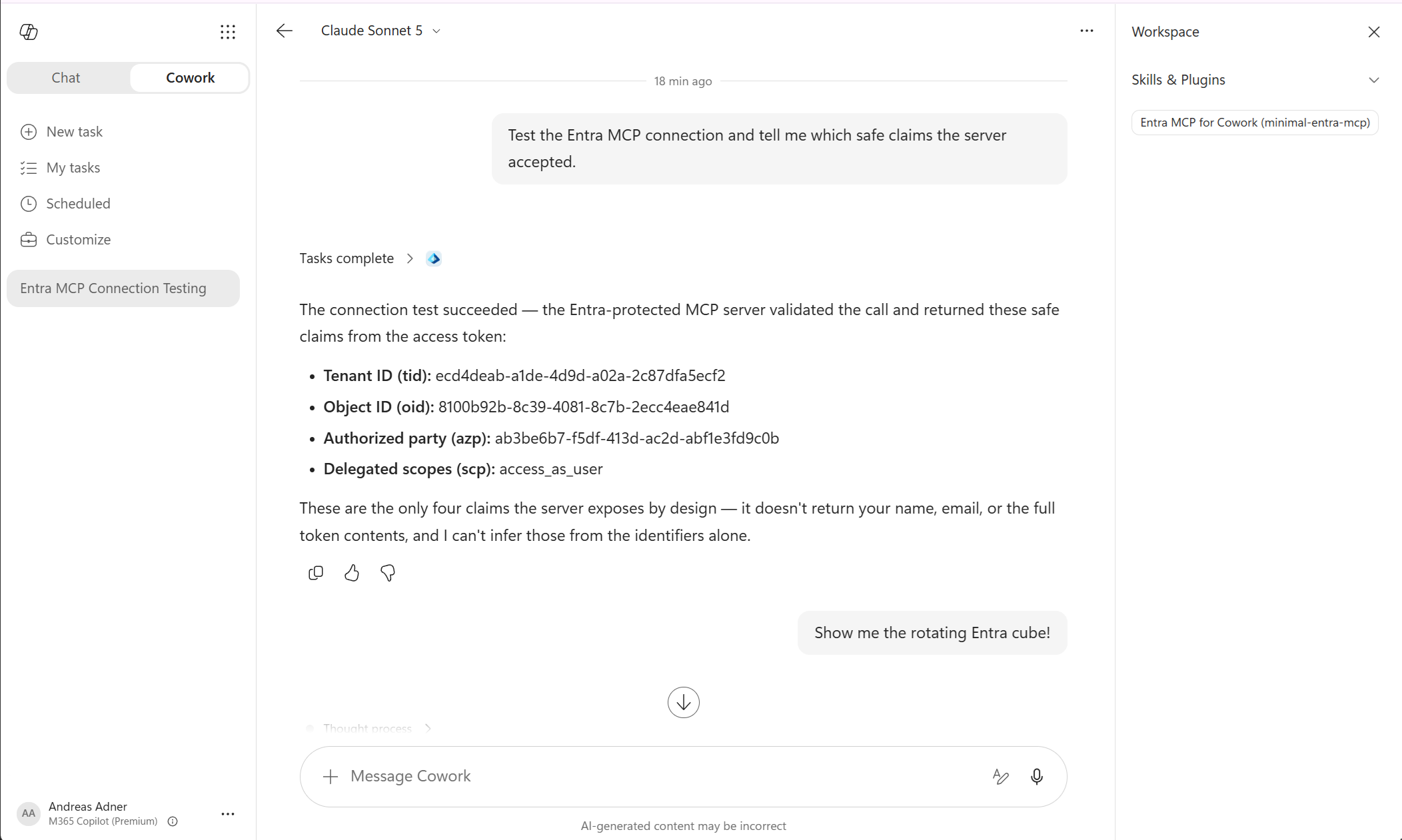
So, after a deep dive down the Entra/MCP rabbit hole, we have both Microsoft 365 Copilot and Copilot Cowork running with Entra ID-secured MCP servers. What a time to be alive! I hope you learned something about auth - I sure did.
For a code-dump of everything, as well as the ramblings between me and Codex/Claude that led to this, see this repo. And here’s a video:
Until next time, happy hacking! ⌨️