Dataverse MCP Server revisited, agent context reduction strategies and the future of BizApps
It has been a while since I last tried the Dataverse MCP Server. Last summer, when it was in preview, I experimented with it extensively and posted my experiences to LinkedIn and to my blog:
-
In this LinkedIn post, I showed how the Dataverse MCP Server can be used from Claude Code, Claude Desktop and Gemini CLI.
-
In this fun experiment, I demonstrated how the Dataverse MCP Server can be used from anywhere - in this case from Excel, implemented as a VBA macro.
I also did a test of how well different LLMs used the Dataverse MCP Server, and blogged about it here. This was a looong time ago, and lots of stuff has happened since then:
-
The Dataverse MCP Server is now generally available.
-
Loads of new models have been released. Around New Year with the release of Opus 4.5, it felt like an inflection point was hit where models became so capable at coding that most developers, myself included, have largely transitioned from hand-coding to AI-assisted tools like Claude Code and OpenAI Codex.
-
It is becoming increasingly clear that we are rapidly moving towards a future where business applications will pretty much be headless APIs and that agentic applications with dynamically generated user interfaces will be the new BizApps. The writing was already on the wall last summer, when MSFT communicated that Power Platform would be API-first rather than UX-first, moving forward.
On that note, I spent a lot of time last autumn exploring the possibilities of agentic user interfaces and dynamically generated UIs. My experiments included dynamic report generation using MCP Resources and a couple of videos showing various dynamic agent-driven UIs. At that time, there wasn’t much available in terms of standardization and specifications for agentic UIs. Some attempts were made, like MCP-UI but it took a good couple of months until things started happening in this space. But then, it completely exploded and now we have an ever growing number of specs to choose from when designing our agentic UIs, like:
-
A2-UI - a protocol for declarative agent-driven interfaces from Google that was announced last year.
-
MCP Apps - the love-child of MCP-UI (mentioned above), an extension to the Model Context Protocol that allows UIs to be served as MCP Resources.
With all these new specifications, the protocol stack for agentic UIs is surely taking shape quickly. When I submitted my talk Creating rich agent user experiences using AG-UI: The Agent-User Interaction Protocol to the AgentCon Stockholm conference a while back, I thought it would be a really obscure topic. But it turned out to tie in pretty well with everything that has been happening with agentic user interfaces lately. AG-UI seems to be the “protocol glue” that ties all these new agent user interface specs to the agent orchestrator backends.
So where is all of this going? At this point in time, I think the AG-UI demos and the AG-UI MCP Apps demos are probably the best way to get a feel for where this tech is heading, and what we can expect from agentic user interfaces in the future. Also, check out my AG-UI demos from AgentCon:
So, while there is a veritable explosion happening in the agentic UI space, we are still waiting for these new standards to make it into the broader Microsoft stack. VS Code is, as always, an early adopter of everything new - they already shipped MCP Apps support back in January - but for those of us in the BizApps world, we are impatiently waiting for this tech to land in Copilot Studio, Microsoft Teams and the rest of the Power Platform. Good things come to those who wait! But I digress, we were talking about Dataverse MCP Server, right? Yes, we were - so let’s see what has happened with it since I last checked it out.
Dataverse MCP Server revisited
As I already mentioned, I spent a lot of time last year exploring the preview version of the Dataverse MCP Server. Now it is GA, so I thought I’d try it out again and see what has changed. Last year, I wanted to try out the locally running Dataverse MCP Server from an agent created in Microsoft Agent Framework, but that didn’t work because of a bug in the C# Model Content Protocol libraries. This bug is now fixed, so let’s try it!
But before we dive into the tech, let’s say some words about the licenses required to use the Dataverse MCP Server. The docs have the following to say:
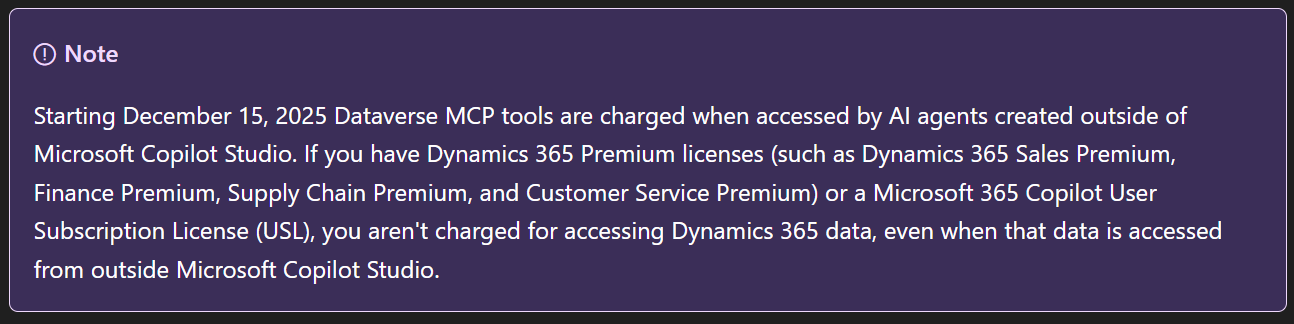
Rather than trying to untangle what this means for makers building agentic applications on Dataverse, I’ll just point you to Jukka Niiranen’s blog post which covers it far more eloquently than I ever could.
So, let’s get started by following the instructions in the documentation for how to set up the Dataverse MCP Server to be used by non-Microsoft clients. Similar to the preview, this still involves creating a Dataverse connection in Power Automate, and using it when running the local STDIO Dataverse MCP Server. Unfortunately, the docs are somewhat confusing here:
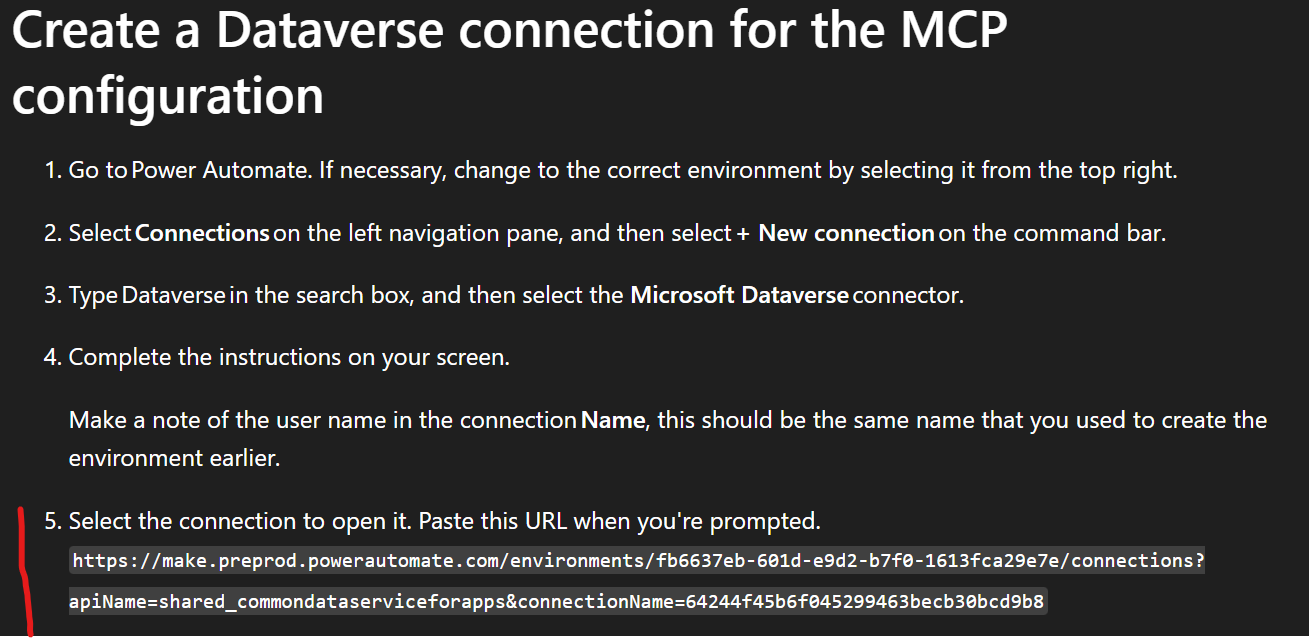
The URL mentioned here differs slightly from the actual URL you see when you open up the Dataverse connection in Power Automate:
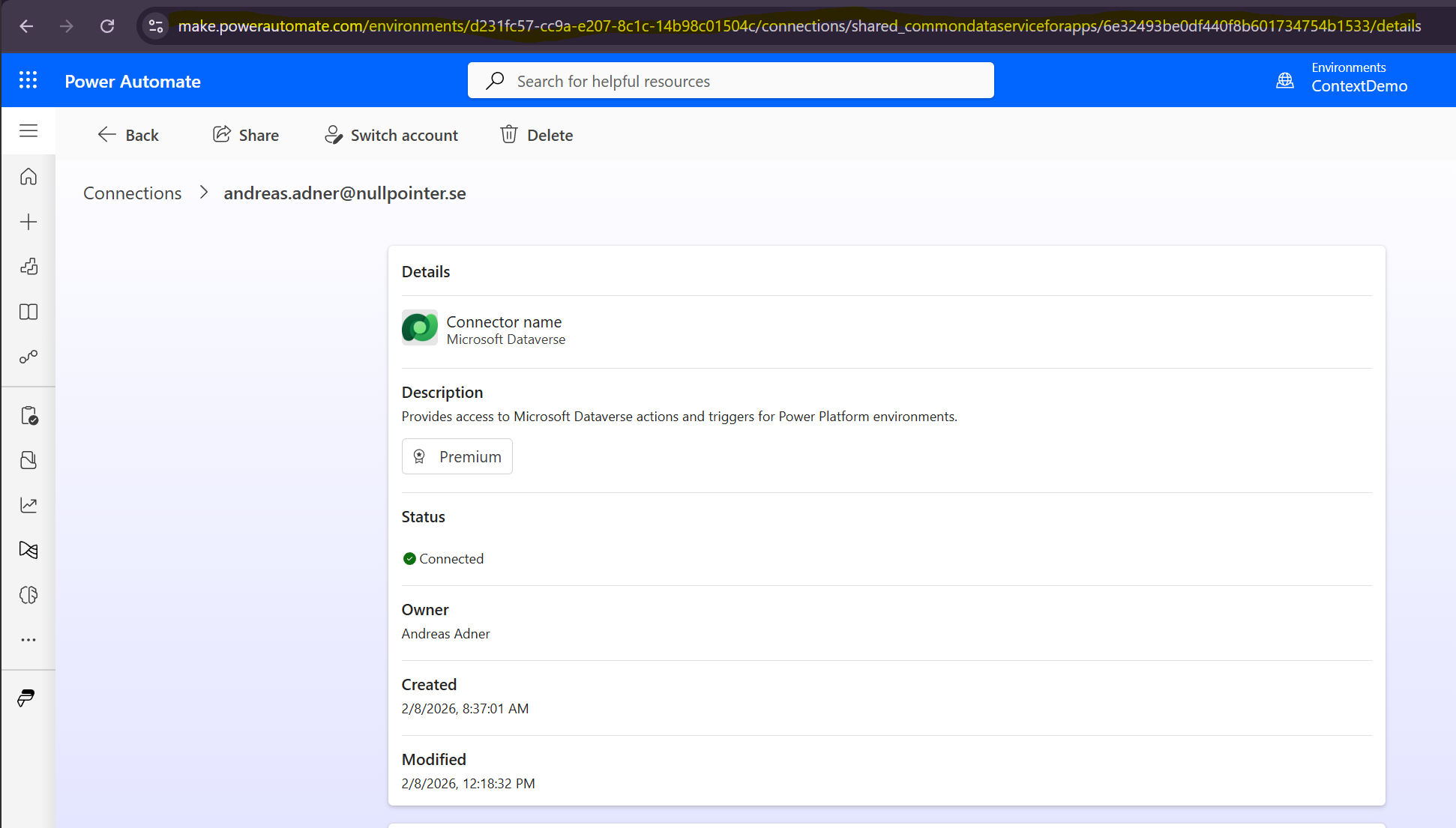
But if we inspect the mysterious URL found in the docs, and compare it to what we have in our address bar when opening up the connection in Power Automate, we can patch together something that works. In my case:
https://make.powerautomate.com/environments/d231fc57-cc9a-e207-8c1c-14b98c01504c/connections?apiName=shared_commondataserviceforapps&connectionName=6e32493be0df440f8b601734754b1533
Using that connection string, we can make the Dataverse MCP Server work in Claude!
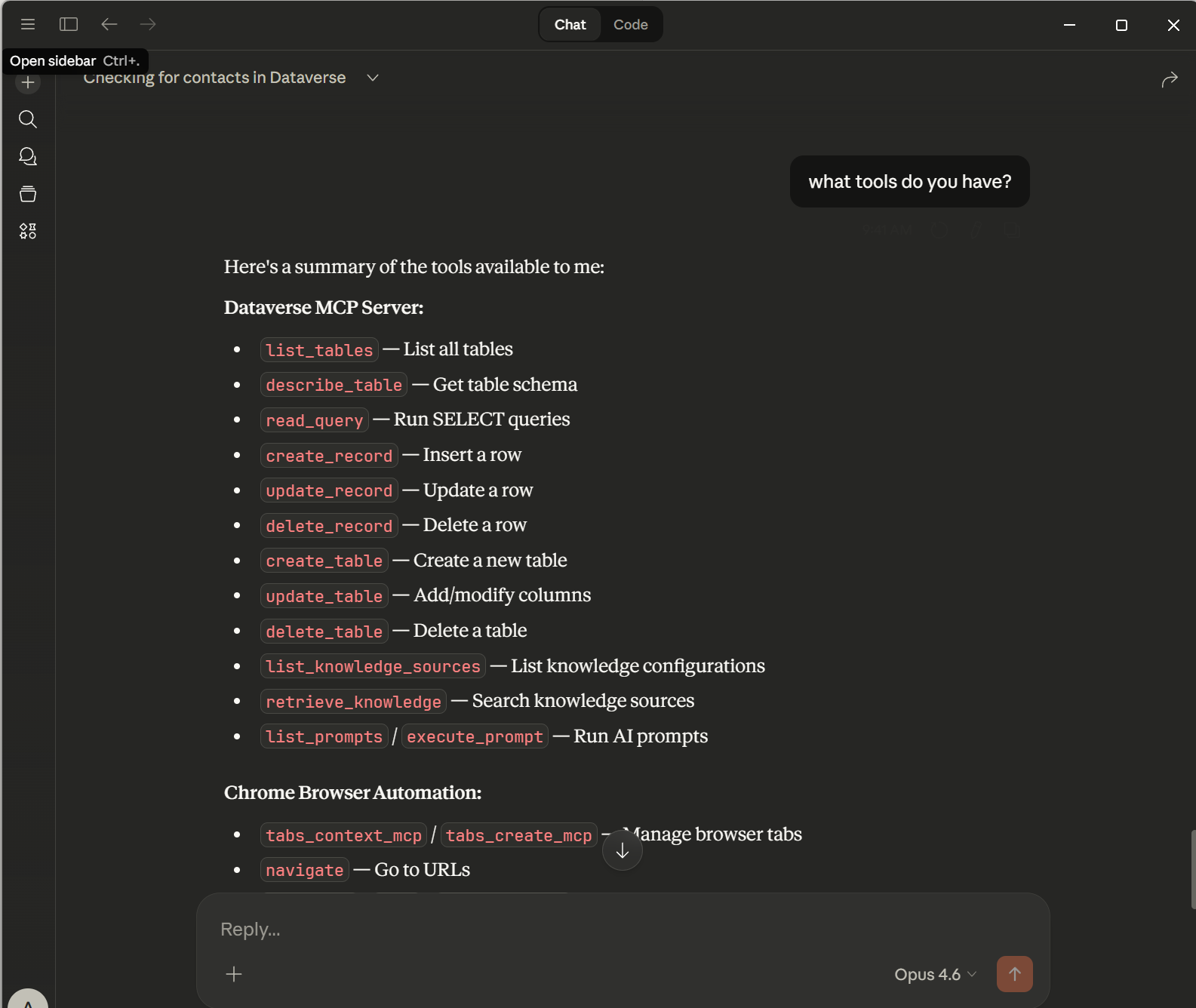
So what has changed? Well, not much. There are a couple of new tools for schema manipulation but apart from that, things are mostly the same. The big thing is probably the remote Dataverse MCP Server that can be used from Copilot Studio, but in this example I am using the good old STDIO Dataverse MCP Server (my prediction for 2026 is that STDIO support will be dropped from the MCP specification for security reasons, but we’ll have to see what happens…)
I assume that much has changed “under the hood”, but functionality-wise the MCP Server is basically the same - including the limitation of being able to return maximum 20 records per call to read_query.
When I participated in the private preview for the Dataverse MCP Server, one of my suggestions was to use MCP Resources to be able to return large result sets without weighing down the context, for example using the pattern described here in the Copilot Studio CAT team blog. Hopefully this will be implemented some day!
But let’s move on to using the Dataverse MCP Server from Microsoft Agent Framework!
The big shift to agentic user interfaces, and the need to manage agent context
Lately, things have started to shift quickly with regard to how we build business applications for our customers. The focus is no longer mainly on creating model-driven apps on top of Dataverse - instead, many customers want to build AI chat interfaces on top of their existing Dataverse/Dynamics 365 applications. And honestly, it is easy to see why. Even with something as basic as a text input box, a natural language interface has some pretty compelling advantages over a traditional BizApp UIs, especially when it comes to finding information:
-
Natural language search beats Advanced Find every day of the week - Instead of navigating to Advanced Find, picking entities, adding filter conditions, choosing operators and remembering exact field names, etc - you just ask “Show me all open opportunities over 500k that haven’t been updated in the last 30 days.” Done. The agent figures it out.
-
You don’t need to know the application - With a traditional model-driven app, there is a learning curve. Where is that view? Which tab has the field I need? How do I navigate to that related entity? With a chat interface, you just describe what you want in plain language and the agent handles the rest.
And this is with text input - which honestly is not exactly the optimal user experience. But imagine what will happen when voice input becomes the norm and you can just talk to your business applications. And when the dynamically generated agentic UIs that I discussed earlier start landing in the Microsoft stack - combining natural language interaction with rich user interfaces generated on the fly - that’s when things get really interesting. We are not that far away from this becoming reality, I think (hope).
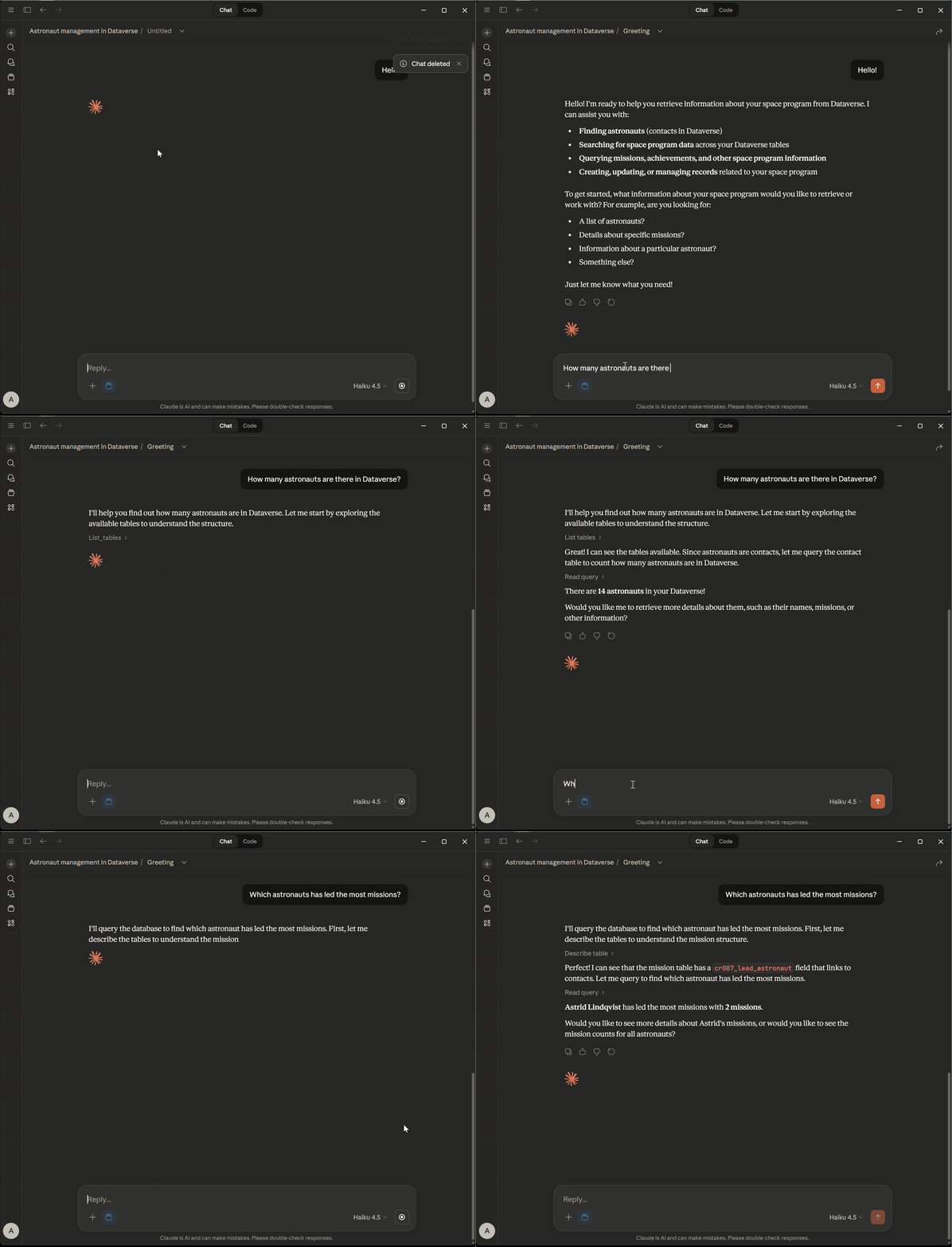
So, a kind of project we have been doing quite a lot lately is chat agents that use tools to communicate with Dataverse, mainly for data retrieval purposes. Not much reasoning needed, and not much data manipulation going on. Such agents are characterized by:
- No real need for reasoning models, speed is important - the agent needs to be snappy!
- Tool calling is frequent and tool calling accuracy is super-important, this kind of agent lives and dies with its ability to call tools.
- Loooooads of data being retrieved, which can lead to context rot and massive context usage and high costs, if not handled properly.
The last bullet here is really interesting and begs the question - how can we manage context for this kind of agent? Yes, let’s talk about chat history reducers - mechanisms for reducing the amount of context used by the agent, without sacrificing (too much) agent ability.
Chat history reducers
When using the Microsoft Agent Framework, one option is to use chat reducers that implement the IChatReducer interface. There are some options available in Microsoft.Extensions.AI:
-
MessageCountingChatReducer- This is a reducer that at the end of each turn throws away all tool calls and their result, as well as truncating the message history if it exceeds a certain number of messages . -
SummarizingChatReducer- This reducer uses an LLM to regularly summarize old messages into one message - and throw away the old messages.
Danish AI guru Rasmus Wulff Jensen has a great video about chat history reduction techniques in Microsoft Agent Framework, check it out!
The OOB reducers mentioned above are unfortunately not very suitable for our particular use case, for a couple of reasons:
-
Since tool calling is key to our use-case, throwing away all tool calls from the history like
MessageCountingChatReducerdoes is not a good idea. -
The
SummarizingChatReducer- while usable for “normal” ChatGPT-style use-cases - doesn’t really bring any real value here. In the Question -> Tool Call -> Response loop, the LLM response is basically always a summary of the result of the tool call and are just a few tokens. LLM summarization doesn’t add anything.
So, let’s explore other options! But while we are at it, let’s also try out the reducers mentioned above so we can see how they behave in our scenario. I created a test harness for evaluating a number of context reducer techniques, that can be found here. In addition to MessageCountingChatReducer, it also evaluates a couple of new reducers:
DummyReducer- No reducer at all! Let’s see what happens if we let the context grow without control!ToolPreservingChatReducer- Works like theMessageCountingChatReducerbut keeps the tool calls in the context, until they are dropped.ContextAwareChatReducer- A more sophisticated reducer that:- Keeps the most recent messages (including tool calls!) without modification.
- Older tool call results are condensed (verbose results being the the main culprit with regard to token consumption), while the arguments are kept so the LLM knows what requests is has made previously.
- Certain tool calls are kept intact - specifically tool calls that retrieve data model metadata - so that the LLM doesn’t have to call these tools repeatedly.
- All messages older than a certain cutoff are thrown away, including metadata tool calls.
In this example, I have set up a Dataverse environment that contains information about astronauts, rockets and space missions. The Dataverse MCP Server is used to retrieve data from Dataverse. We have a static set of questions that are asked in sequence:
- “List all the astronauts in the system and their specialization!”
- “What rockets are available?”
- “Which astronaut is leading the most missions?”
- “What is the specialization of Astrid Lindqvist?”
- “Earlier you listed the astronauts. Can you recall who the first one was?”
- “What was the specialization of Alan?”
Let’s run the tests and see how these different reducers behave!
DummyReducer
As mentioned above, this reducer doesn’t reduce at all but keeps the full context indefinitely. In the first turn we can see that the agent retrieves the metadata it needs, and since no reduction is ever done, the context just keeps growing as questions are asked.
── Turn 1 ──────────────────────────────────────────────────
  Q: "List all the astronauts in the system and their specialization!"
  [Tool Call] list_knowledge_sources()
  [Tool Call] list_tables()
  [Tool Call] read_query(querytext=SELECT TOP 20 contactid, fullname, jobtitle FROM contact ORDER BY fullname)
  [Tool Call] describe_table(tablename=contact)
  [Tool Call] read_query(querytext=SELECT TOP 50 fullname, contact_specialization FROM contact WHERE jobtitle = 'As...)
  [Tool Call] read_query(querytext=SELECT TOP 20 fullname, contact_specialization FROM contact WHERE jobtitle = 'As...)
  A: "Here are the astronauts (contacts) in the system and their specialization:  | Astronaut | Specialization | |---|---| | Alan Shepard | Pilot | | Amara Okafor | Payload Specialist | | Astrid Lindqvist |..."

  Tokens:      Input: 47 065  |  Output:    296
  Cumulative:  Input: 47 065  |  Output:    296
  Session messages: 14  |  Sent to LLM: 13
────────────────────────────────────────────────────────────────
…
── Turn 6 ──────────────────────────────────────────────────
  Q: "What was the specialization of Alan?"
  A: "Alan Shepard’s specialization is **Pilot**."

  Tokens:      Input: 13 036  |  Output:     12
  Cumulative:  Input: 160 054  |  Output:    547
  Session messages: 32  |  Sent to LLM: 31
────────────────────────────────────────────────────────────────

========================== COMPARISON SUMMARY ==========================
Reducer                          |   Total In |  Total Out | Final Msgs |   Last LLM
------------------------------------------------------------------------------------
DummyReducer                     |    160 054 |        547 |         32 |         31
=========================================================================
In total, 160054 input tokens are spent. The full transcript of the run can be found here.
MessageCountingReducer
This reducer throws away all tool calls and their results while keeping a fixed number of regular messages.
Since all tool calls are stripped from the context, the agent needs to retrieve the data model metadata over and over again, as can be seen here:
── Turn 1 ──────────────────────────────────────────────────
  Q: "List all the astronauts in the system and their specialization!"
  [Tool Call] list_knowledge_sources()
  [Tool Call] list_tables()
  [Tool Call] describe_table(tablename=contact)
  [Tool Call] read_query(querytext=SELECT TOP 20 fullname, contact_specialization FROM contact WHERE contact_specia...)
  A: "| Astronaut | Specialization | |---|---| | Alan Shepard | Pilot | | Amara Okafor | Payload Specialist | | Astrid Lindqvist | Commander | | Buzz Aldrin | Pilot | | Chris Hadfield | Mission Specialist |..."

  Tokens:      Input: 21 917  |  Output:    223
  Cumulative:  Input: 21 917  |  Output:    223
  Session messages: 8  |  Sent to LLM: 7
────────────────────────────────────────────────────────────────

── Turn 2 ──────────────────────────────────────────────────
  Q: "What rockets are available?"
info: MyMessageCountingChatReducer[0]
      Chat history reduced: 8 messages → 2 retained. Dropped 0 non-system messages exceeding limit of 5, dropped 6 function call/result messages.
  [Tool Call] list_knowledge_sources()
  [Tool Call] list_tables()
  [Tool Call] describe_table(tablename=cr087_rocket)
  [Tool Call] read_query(querytext=SELECT cr087_rocketid, cr087_rocketname, statecode, statuscode, createdon, modif...)
  A: "The following rockets are available in the system (all currently **Active**):  - Atlas   - Delta   - Falcon   - Nova   - Saturn   - Soyuz"

  Tokens:      Input: 21 800  |  Output:    137
  Cumulative:  Input: 43 717  |  Output:    360
  Session messages: 12  |  Sent to LLM: 11
────────────────────────────────────────────────────────────────
We can also see that when the reducer reaches its limit of regular messages, and starts dropping these, it is (of course) not able to respond to questions relating to data retrieved earlier in the conversation:
── Turn 4 ──────────────────────────────────────────────────
  Q: "What is the specialization of Astrid Lindqvist?"
info: MyMessageCountingChatReducer[0]
      Chat history reduced: 14 messages → 5 retained. Dropped 1 non-system messages exceeding limit of 5, dropped 8 function call/result messages.
  [Tool Call] list_knowledge_sources()
  [Tool Call] list_tables()
  [Tool Call] describe_table(tablename=contact)
  [Tool Call] read_query(querytext=SELECT TOP 20 fullname, contact_specialization FROM contact WHERE fullname = 'As...)
  A: "Astrid Lindqvist’s specialization is **Commander**."

  Tokens:      Input: 27 456  |  Output:     98
  Cumulative:  Input: 99 382  |  Output:    643
  Session messages: 15  |  Sent to LLM: 14
────────────────────────────────────────────────────────────────

── Turn 5 ──────────────────────────────────────────────────
  Q: "Earlier you listed the astronauts. Can you recall who the first one was?"
info: MyMessageCountingChatReducer[0]
      Chat history reduced: 15 messages → 5 retained. Dropped 2 non-system messages exceeding limit of 5, dropped 8 function call/result messages.
  A: "I didn’t list any astronauts earlier in this chat—only rockets (Atlas, Delta, Falcon, Nova, Saturn, Soyuz) and then details about Astrid Lindqvist.  If you mean the first rocket I listed, it was **Atl..."

  Tokens:      Input:  2 109  |  Output:     55
  Cumulative:  Input: 101 491  |  Output:    698
  Session messages: 7  |  Sent to LLM: 6
────────────────────────────────────────────────────────────────

========================== COMPARISON SUMMARY ==========================
Reducer                          |   Total In |  Total Out | Final Msgs |   Last LLM
------------------------------------------------------------------------------------
MyMessageCountingChatReducer     |    128 545 |        812 |         15 |         14
=========================================================================
In total, 128545 input tokens are spent, which is less than the DummyReducer but at the price of poor agent memory and worse answers. The full transcript of the run can be found here.
ToolPreservingChatReducer
The ToolPreservingChatReducer works like the MessageCountingReducer but keeps the tool calls in context. It also has a mechanism for making sure that tool call result messages are not being orphaned by the tool call message being dropped.
We can see that since the tool calls are kept in context, the agent doesn’t have to call metadata tools repeatedly:
── Turn 1 ──────────────────────────────────────────────────
  Q: "List all the astronauts in the system and their specialization!"
  [Tool Call] list_knowledge_sources()
  [Tool Call] list_tables()
  [Tool Call] describe_table(tablename=contact)
  [Tool Call] read_query(querytext=SELECT fullname, contact_specialization FROM contact WHERE contact_specializatio...)
  A: "| Astronaut | Specialization | |---|---| | Alan Shepard | Pilot | | Amara Okafor | Payload Specialist | | Astrid Lindqvist | Commander | | Buzz Aldrin | Pilot | | Chris Hadfield | Mission Specialist |..."

  Tokens:      Input: 21 931  |  Output:    237
  Cumulative:  Input: 21 931  |  Output:    237
  Session messages: 8  |  Sent to LLM: 7
────────────────────────────────────────────────────────────────
...
── Turn 3 ──────────────────────────────────────────────────
  Q: "Which astronaut is leading the most missions?"
info: ToolPreservingChatReducer[0]
      Chat history reduced: 14 messages → 11 retained (target: 10). Dropped 3 messages (cut at index 3).
warn: ToolPreservingChatReducer[0]
      Dropped tool messages from context: 1 function call(s), 1 function result(s). Tool context has been lost for these interactions.
  [Tool Call] read_query(querytext=SELECT TOP 1 fullname, contact_missions_completed FROM contact WHERE contact_mis...)
  A: "Chris Hadfield is leading the most missions, with **3 missions completed**."

  Tokens:      Input: 20 363  |  Output:     65
  Cumulative:  Input: 71 749  |  Output:    389
  Session messages: 15  |  Sent to LLM: 14
────────────────────────────────────────────────────────────────
As soon as older regular messages are dropped, it suffers from the same issue as the MessageCountingReducer:
── Turn 5 ──────────────────────────────────────────────────
  Q: "Earlier you listed the astronauts. Can you recall who the first one was?"
info: ToolPreservingChatReducer[0]
      Chat history reduced: 18 messages → 11 retained (target: 10). Dropped 7 messages (cut at index 7).
warn: ToolPreservingChatReducer[0]
      Dropped tool messages from context: 2 function call(s), 2 function result(s). Tool context has been lost for these interactions.
  A: "I can’t reliably recall that from our earlier messages alone.  If you tell me which list you mean (e.g., “all astronauts ordered by name” or “top missions”), or if you want, I can re-run the query to ..."

  Tokens:      Input:  6 484  |  Output:     59
  Cumulative:  Input: 98 922  |  Output:    553
  Session messages: 13  |  Sent to LLM: 12
────────────────────────────────────────────────────────────────
...
========================== COMPARISON SUMMARY ==========================
Reducer                          |   Total In |  Total Out | Final Msgs |   Last LLM
------------------------------------------------------------------------------------
ToolPreservingChatReducer        |    111 812 |        600 |         14 |         13
=========================================================================
In total, 111812 input tokens are spent, which is less than the MessageCountingReducer, while the accuracy is the same. The transcript can be found here.
ContextAwareChatReducer
This reducer keeps recent tool calls intact, while condensing the results of older tool calls. It also keeps data model metadata tool calls completely intact.
Here we can see the reducer in action, preserving the metadata tool calls (list_tables and describe_table) while condensing the other tool calls:
── Turn 3 ──────────────────────────────────────────────────
  Q: "Which astronaut is leading the most missions?"
info: ContentAwareChatReducer[0]
      Phase 2: 14 messages split into 9 historical + 5 recent. Condensing historical data tool results.
info: ContentAwareChatReducer[0]
        Condensed tool result: list_knowledge_sources (call_Ij9XqcyqCpOv6poFTpgCFJvh) → {"@odata.context":"https://orga7f9a5a6.crm4.dynamics.com/api/data/v9.1.0/$metadata#expando","value":[]}
info: ContentAwareChatReducer[0]
        Preserved tool result: list_tables (call_ddNb1LRFDNMGHuYoXYvIEeK6)
info: ContentAwareChatReducer[0]
        Preserved tool result: describe_table (call_yjomSmfZxqLumvg2wCc6cr1V)
info: ContentAwareChatReducer[0]
        Condensed tool result: read_query (call_CLGs3ncXnWifJgWnl2c0FCRi) → {"@odata.context":"https:// [truncated]
info: ContentAwareChatReducer[0]
      Phase 3: 14 messages within maxMessages (20), no trimming needed.
info: ContentAwareChatReducer[0]
      Reduction complete: 14 → 14 messages.
  [Tool Call] read_query(querytext=SELECT TOP 1 fullname, contact_missions_completed
FROM contact
WHERE contact_mis...)
  A: "**Chris Hadfield** is leading the most missions, with **3 missions completed**."

  Tokens:      Input: 19 514  |  Output:     70
  Cumulative:  Input: 70 966  |  Output:    385
  Session messages: 18  |  Sent to LLM: 17
────────────────────────────────────────────────────────────────
...
========================== COMPARISON SUMMARY ==========================
Reducer                          |   Total In |  Total Out | Final Msgs |   Last LLM
------------------------------------------------------------------------------------
ContentAwareChatReducer          |    119 321 |        509 |         25 |         24
=========================================================================
For this particular use-case, this reducer works really well, for a couple of reasons:
-
It doesn’t clog down the context with tool call results, except for the most recent tool call(s). Data retrieved from Dataverse can be huge, so getting rid of this data as soon as it is irrelevant is extremely important.
-
A good understanding of the data model is super-important, and the metadata retrieval tool calls are they key to this understanding. That’s why the reducerar keeps these intact in the context for a prolonged amount of time, until they are finally disregarded when they reach “old age”.
In total, 119321 input tokens are spent, which is slightly worse than the ToolPreservingChatReducer for this very limited scenario. But as the number of requests rise, and if the amount of data retrieved by the tools is huge then the ContextAwareChatReducer will vastly outperform the other reducers. The transcript can be found here.
Summary
Context management is one of those things that every consumer LLM product already handles for you. ChatGPT, Claude, Gemini - they all silently summarize and compress your conversation history as it grows, and for general-purpose chat this works great. But when you’re building agents that act as natural language interfaces on top of business data - where the conversation is dominated by tool calls returning large chunks of structured data - you can’t just rely on generic summarization. The shape of these conversations is fundamentally different from a typical chat: it’s a tight loop of questions, tool calls and data, where what matters is not the prose but the results and the metadata that enables future tool calls.
For this kind of agent, you need to take control of context management yourself. The out-of-the-box reducers in Microsoft.Extensions.AI are a good starting point, but as the tests above show, a context reduction strategy that understands the semantics of your particular conversation pattern - what to keep, what to condense, and what to drop - will give you better accuracy at lower cost as conversations grow. I hope you find this deep dive into context reducers useful!
Until next time, happy hacking!