Agent 365 notifications
In my last blog post I explained in detail how to use the Agent 365 CLI to set up the infrastructure necessary to deploy a custom agent to Agent 365. So if you are just starting out, that post is a great way to get the prerequisites in place to be able to start developing your agent.
In this blog post I discuss how to build the actual agent, using the Agent 365 SDK, with specific focus on how to use the notification functionality in the SDK. Our goal is to create an agent that can respond to messages from Teams and other channels, reply to comments in Word documents and respond to emails. Let’s get started!
The SDK libraries
There are quite a few SDK packages available for Agent 365. The ones of special interest for us today are:
-
Microsoft.Agents.A365.Notifications - a package that “provides notification services for agents, including sending and managing messages and alerts”. This package makes it possible for our agent to respond to e.g. comments in Word documents, and reply to emails.
-
Microsoft.Agents.A365.Tooling - a package that “provides tools for agent development, debugging, and management”. This package gives us the ability to use the first-party Agent 365 MCP Servers.
-
Microsoft.Agents.A365.Tooling.Extensions.AgentFramework - a package that provides “tooling support for agents using Agent Framework features”. This library is needed since we intend to use the Microsoft Agent Framework as orchestrator.
There are lots of other libraries available that handle observability and telemetry, but these were omitted from this demo for the sake of simplicity.
Bootstrapping the agent
As I mentioned in my last blog post, devtunnels is a useful tool. The post describes the setup needed to utilize devtunnels to debug your agent locally, so check it out if you haven’t done so already.
The code for the agent can be found in this repo, let’s go through it to understand how it works.
The agent is basically a .NET web app that (locally) listens to port 3978 and that accepts requests to the /api/messages endpoint. This is the endpoint that the Bot Messaging service that is deployed to the cloud routes requests to, as mentioned in my last blog post.
We wire up this endpoint to accept requests:
// Map the /api/messages endpoint to the AgentApplication
    app.MapPost("/api/messages", async (HttpRequest request, HttpResponse response, IAgentHttpAdapter adapter, IAgent agent, CancellationToken cancellationToken) =>
    {
            await adapter.ProcessAsync(request, response, agent, cancellationToken);
    });
...
    app.MapGet("/", () => "Agent Framework Notification Agent");
    app.UseDeveloperExceptionPage();
    app.MapControllers().AllowAnonymous();

    app.Urls.Add($"http://localhost:3978");
The agent is added to the pipeline:
builder.AddAgent<MyAgent>();
We inject the services we need to use the A365 Tooling Servers:
builder.Services.AddSingleton<IMcpToolRegistrationService, McpToolRegistrationService>();
builder.Services.AddSingleton<IMcpToolServerConfigurationService, McpToolServerConfigurationService>();
This allows the agent to load the MCP Servers that are defined in ToolingManifest.json. For our agent, these are:
- mcp_MailTools that allows the agent to send and reply to emails.
- mcp_WordServer that lets the agent reply to comments in Word documents, among other things.
In MyAgent.cs we wire up the three activity handlers that our agent needs:
public MyAgent(AgentApplicationOptions options,
            IChatClient chatClient,
            IConfiguration configuration,
            IMcpToolRegistrationService toolService,
            IHttpClientFactory httpClientFactory,
            ILogger<MyAgent> logger) : base(options)
        {
            _chatClient = chatClient;
            _configuration = configuration;
            _logger = logger;
            _toolService = toolService;
            _httpClientFactory = httpClientFactory;

            // Handle A365 Notification Messages.
            this.OnAgenticWordNotification(HandleWordCommentNotificationAsync, autoSignInHandlers: new[] { AgenticIdAuthHandler });
            this.OnAgenticEmailNotification(HandleEmailNotificationAsync, autoSignInHandlers: new[] { AgenticIdAuthHandler });

            // Handles all messages, regardless of channel - needs to be the last route in order not to hijack A365 notification handlers.
            this.OnActivity(ActivityTypes.Message, OnMessageAsync, autoSignInHandlers: new[] { AgenticIdAuthHandler });
        }
The order of the handlers is important - the notification handlers need to come before the general OnMessageAsync handler, so that this generic one doesn’t swallow the notification messages.
The notification handlers
OnAgenticWordNotification is called when the agent is @-tagged in a Word comment:
private async Task HandleWordCommentNotificationAsync(
ITurnContext turnContext,
ITurnState turnState,
AgentNotificationActivity activity,
CancellationToken cancellationToken)
{
    var comment = activity.WpxCommentNotification;

    var attachments = turnContext.Activity.Attachments;

    var contentUrl = attachments[0].ContentUrl;
...
    var userText = turnContext.Activity.Text?.Trim() ?? string.Empty;
    var _agent = await GetClientAgent(turnContext, turnState, _toolService, AgenticIdAuthHandler);
...
    var response = await _agent.RunAsync(
        $"""
        Your task is to respond to a comment in a Word file. First, get the full content
        of the Word file to understand the context and find out what the comment is
        referring to. Use the tool WordGetDocumentContent for this purpose. The URL to
        the document is {contentUrl}. Then find the text that the comment with id
        {comment.CommentId} is referring to and respond with an answer.
        """);

    _logger?.LogInformation("Agent response: {Response}", response.ToString());

    //Note that we don't respond at the end of this method - we instead let the Word MCP Server handle the reply to the comment.
}
Unfortunately the WpxCommentNotification doesn’t include all the information about the document that is needed by the WordReplyToComment tool in the mcp_WordServer. To solve this, we instruct the agent to first call the WordGetDocumentContent to retrieve this required info. This tool call also returns the full document, which enables the agent to pinpoint the exact text was highlighted in the Word comment and get the full context (at the expense of lots of tokens, of course…).
The agent then uses the WordReplyToComment MCP tool to reply to the comment, like so:
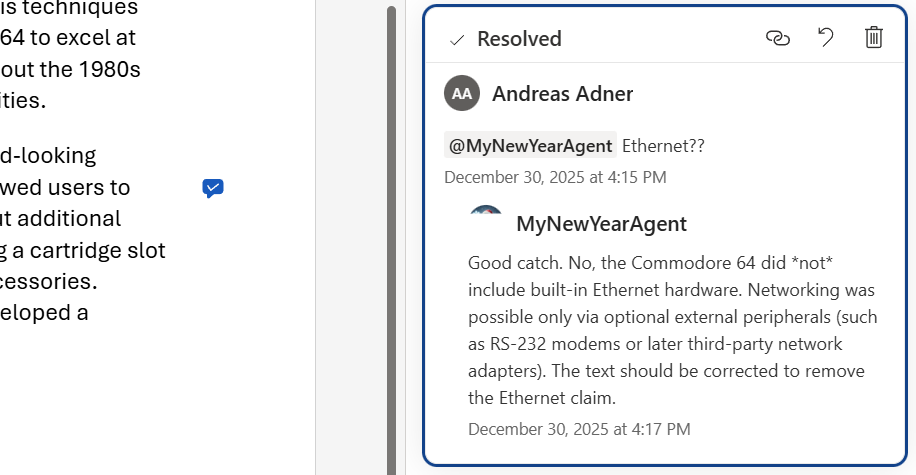
We can check the logs to understand the agent’s reasoning, as it replies to the comment:
Agent response: I’ve reviewed the full document and located the comment with ID 469179BD, which refers to the statement claiming that the Commodore 64 had built-in Ethernet networking hardware.

I’ve replied directly to that comment explaining that this is incorrect: the Commodore 64 did not include built-in Ethernet. Any networking was done via external peripherals such as modems (e.g., over RS‑232) or much later third-party network adapters. I also noted that the text should be corrected to remove the Ethernet claim.
Moving on to the HandleEmailNotificationAsync handler:
private async Task HandleEmailNotificationAsync(
ITurnContext turnContext,
ITurnState turnState,
AgentNotificationActivity activity,
CancellationToken cancellationToken)
{
    var email = activity.EmailNotification;
...
    var userText = turnContext.Activity.Text?.Trim() ?? string.Empty;
    var _agent = await GetClientAgent(turnContext, turnState, _toolService, AgenticIdAuthHandler, "You are a helpful assistant.");
...
    var response = await _agent.RunAsync(
        $"""
        You have received a mail and your task is to reply to it. Please respond to the
        mail using the ReplyToMessageAsync tool using HTML formatted content. The ID of
        the email is {email.Id}. This is the content of the mail you received: {userText}
        """);

    _logger?.LogInformation("Agent response: {Response}", response.ToString());
}
Here we simply instruct the agent to reply to the email message it has received by invoking the ReplyToMessageAsync tool in the mcp_MailTools MCP Server.
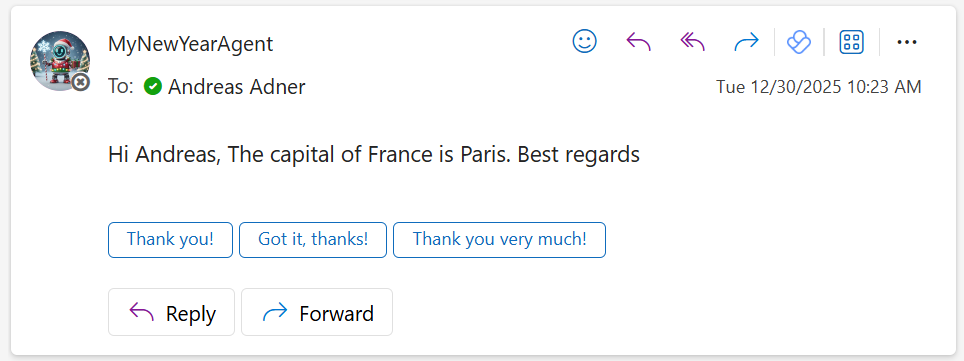
The last handler, OnMessageAsync, is for responding to messages from all other channels, for example Teams.
protected async Task OnMessageAsync(ITurnContext turnContext, ITurnState turnState, CancellationToken cancellationToken)
{
    var userText = turnContext.Activity.Text?.Trim() ?? string.Empty;
    var _agent = await GetClientAgent(turnContext, turnState, _toolService, AgenticIdAuthHandler);

    // Read or Create the conversation thread for this conversation.
    AgentThread? thread = GetConversationThread(_agent, turnState);

    var response = await _agent!.RunAsync(userText, thread, cancellationToken: cancellationToken);

    await turnContext.SendActivityAsync(response.ToString());

    turnState.Conversation.SetValue("conversation.threadInfo", ProtocolJsonSerializer.ToJson(thread.Serialize()));
}
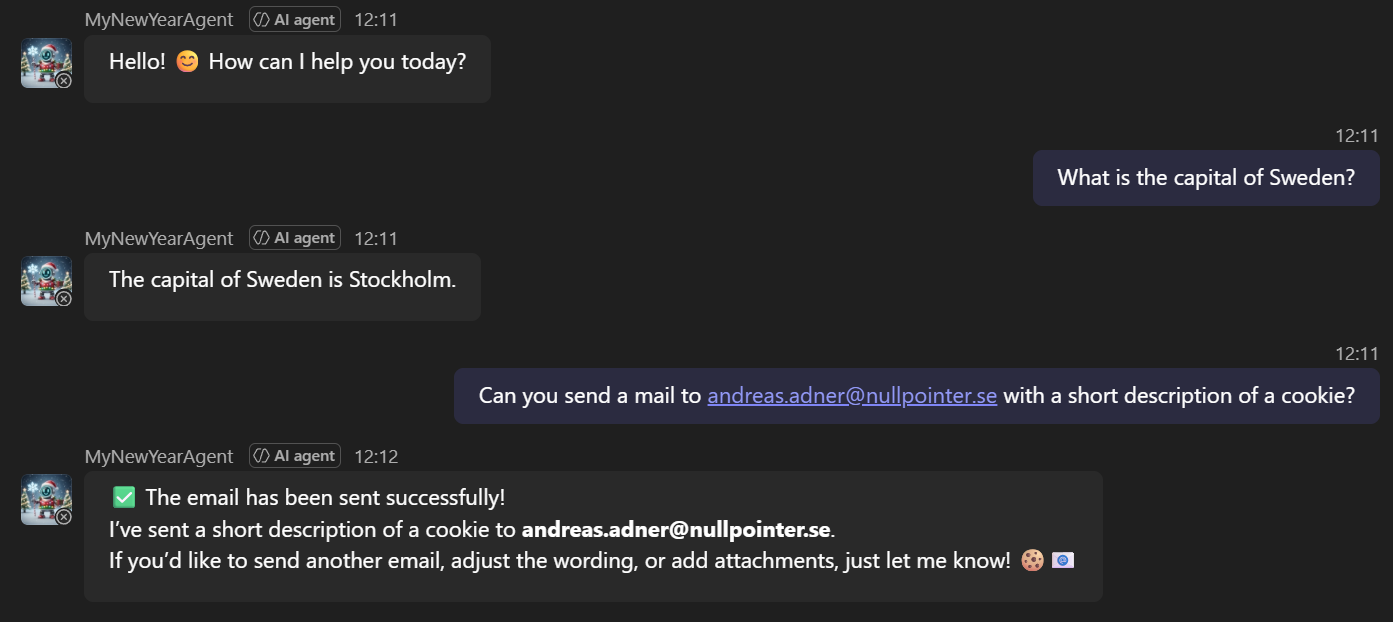
The handler also (de)serializes the conversation thread state, so that it can remember previous messages and keep the whole conversation “in memory”. And of course, it can use all the MCP Servers that are registered. In this example, it uses the mcp_MailTools MCP Server to send an email:
That’s pretty much all there is to it…
All the code can be found in this repo, and here is a short video of the agent replying to a Word comment:
Thanks to all of you that have been following my blog during 2025, it has been fun exploring MCP, agents, LLMs and now lately Agent 365. looking forward to more fun stuff in 2026! Until then, happy new year and happy hacking!